播放器
控件
Hugo 把 data/music/generated.json 写入前端,入口位于 layouts/partials/footer/custom.html:
1
2
3
4
5
6
| <script>
window.__ELAINA_MUSIC_PLAYLIST__ = {{ .Site.Data.music.generated | default (slice) | jsonify | safeJS }};
</script>
{{ with resources.Get "js/music-player.js" }}
<script src="{{ .RelPermalink }}" defer></script>
{{ end }}
|
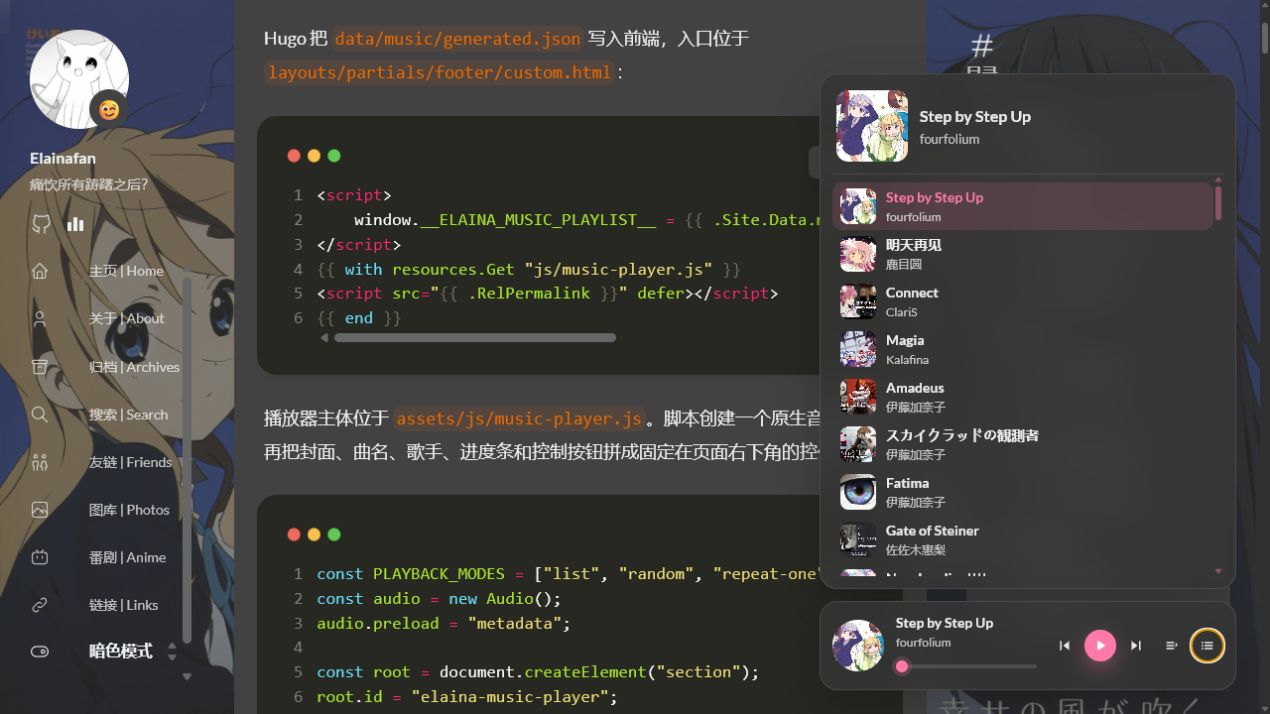
播放器主体位于 assets/js/music-player.js。脚本创建一个原生音频对象,再把封面、曲名、歌手、进度条和控制按钮拼成固定在页面右下角的控件:
1
2
3
4
5
6
7
8
| const PLAYBACK_MODES = ["list", "random", "repeat-one"];
const audio = new Audio();
audio.preload = "metadata";
const root = document.createElement("section");
root.id = "elaina-music-player";
root.className = "music-player";
document.body.append(root);
|
模式按钮会在列表循环、随机播放和单曲循环之间切换。歌单面板平时收起,点击封面或列表按钮后再展开,站内页面切换时播放器节点不会进入 PJAX 的替换区域。
{{ .Site.Data.music.generated | default (slice) | jsonify | safeJS }} 会把数据文件转成前端可用的数组。重新生成歌单后,不需要再到播放器脚本里逐首修改 name、artist、url 和 cover。
样式集中在 assets/scss/music-player.scss,再由 assets/scss/custom.scss 引入:
1
| @import "music-player.scss";
|
明暗模式共用同一套结构,颜色则继续取 Stack 的卡片、正文和强调色变量,不会在暗色页面里突然出现一块白色控件。
歌单
歌单保存在 data/music/generated.json,由 scripts/sync_music.py
生成。
每首本地歌曲使用一个目录,例如音频放在 static/music/歌曲名/music.mp3,封面放在 static/music/歌曲名/cover.jpg。
脚本会扫描 static/music,找到每个目录里的 music.mp3、music.m4a、music.ogg、music.flac 或 music.wav,再配上 cover.jpg、cover.png 等封面,最后生成播放器读取的数组。
在站点根目录运行:
1
| python scripts\sync_music.py local
|
本地目录与 Bilibili 收藏夹使用同一个脚本整理,生成的数据结构一致。
Bilibili 同步
Bilibili 收藏夹地址放在 data/music/sources.json:
1
2
3
4
5
| {
"bilibili": {
"favlist_url": "https://space.bilibili.com/<你的UID>/favlist?fid=<收藏夹ID>&ftype=create"
}
}
|
运行同步命令:
1
| python scripts\sync_music.py bilibili
|
脚本通过 Bilibili 收藏夹 API 读取视频列表,并从收藏夹 URL 中解析 fid。
命令行也可以只传 media_id:
1
| python scripts\sync_music.py bilibili --media-id <收藏夹ID>
|
每个视频依次完成三项处理:
- 读取视频详情,并按 BV 号建立本地目录。
- 调用
yt-dlp 下载音频。Bilibili 音频通常保存为 music.m4a,不需要额外依赖 ffmpeg 转码。 - 在音频目录中写入
info.json,保存播放器需要的元数据,再扫描 static/music 生成 data/music/generated.json。
非公开收藏夹需要传入 Cookie:
1
| python scripts\sync_music.py bilibili --cookie-file bilibili.cookie.txt
|
bilibili.cookie.txt 只保存在本地,不提交到仓库。
播放状态
整页刷新后,原生 Audio 也会重新创建,因此脚本用 localStorage 保存歌曲下标、播放时间、暂停状态、音量、面板展开状态和播放模式:
 1
 2
 3
 4
 5
 6
 7
 8
 9
10
11
12
13
| const STORAGE_KEY = "elainaMusicPlayerState";
function saveState() {
const state = {
index: currentIndex,
currentTime: Number.isFinite(audio.currentTime) ? audio.currentTime : 0,
paused: audio.paused,
volume: audio.volume,
expanded: isExpanded,
mode: playbackMode
};
localStorage.setItem(STORAGE_KEY, JSON.stringify(state));
}
|
初始化时读出保存的数据,并把播放进度暂存在 pendingSeek。音频元数据加载完成后才能取得总时长,loadedmetadata 事件负责恢复进度:
1
2
3
4
5
6
7
| audio.addEventListener("loadedmetadata", () => {
if (pendingSeek > 0 && Number.isFinite(audio.duration)) {
audio.currentTime = Math.min(pendingSeek, Math.max(audio.duration - 0.25, 0));
}
pendingSeek = 0;
updateProgress();
});
|
播放、暂停、切歌、调节音量和关闭页面时都会更新这份状态。localStorage 处理整页刷新,PJAX 处理站内跳转。
PJAX
页面切换
普通网页跳转时,浏览器会重新请求 HTML,重新解析 head 和 body,重新执行脚本。对于播放器来说,这意味着旧的 Audio 对象和控件都会消失,新页面只能重新创建一套。
PJAX 拦截站内链接,通过 Ajax 请求新页面,只替换指定区域。浏览器不会整页刷新,位于替换区域外的播放器可以继续播放。
PJAX 代码位于 layouts/partials/footer/custom.html。库通过 Hugo Pipes 引入:
1
| <script src="https://cdn.jsdelivr.net/npm/pjax/pjax.min.js"></script>
|
实例配置如下:
1
2
3
4
5
6
| var pjax = new Pjax({
selectors: [
".main-container", ".js-Pjax", ".Timer"
],
cacheBust: false
})
|
selectors 指定 PJAX 切换页面时替换的 DOM。
.main-container 是 Stack 的主体布局容器,包含正文与左右侧栏,也是页面切换时的主要替换区域。
.js-Pjax 主要用于评论脚本相关区域。因为评论是外部脚本生成的,如果不把它纳入 PJAX 的更新范围,页面切换后评论区很容易残留旧状态。
.Timer 和运行时间区域有关。页面里使用的是 <div class="Timer">,因此选择器前面的点不能省略;写成 Timer 会被当成自定义标签名,切页后这部分便不会正确替换。
body class
Stack 主题的不同页面会给 body 设置不同 class,例如文章页和搜索页的 class 不完全相同。如果 PJAX 只替换 .main-container,而不更新 body.className,那么页面样式可能会串。
代码通过 handleResponse 同步新页面的 body.className:
 1
 2
 3
 4
 5
 6
 7
 8
 9
10
11
12
13
14
| pjax._handleResponse = pjax.handleResponse;
pjax.handleResponse = function (responseText, request, href, options) {
if (request.responseText.match("<html")) {
if (responseText) {
let newDom = new DOMParser().parseFromString(responseText, 'text/html');
let bodyClass = newDom.body.className;
document.body.setAttribute("class", bodyClass)
}
pjax._handleResponse(responseText, request, href, options);
} else {
// handle non-HTML response here
}
}
|
新页面的 HTML 会先被解析成 DOM,读取其中的 body.className 并同步到当前页面,再交还给 PJAX 处理响应。
同步 body.className 后,搜索页、文章页与普通页面之间切换时仍会使用各自的页面样式。
顶部进度条
顶部进度条负责显示 PJAX 请求状态。
进度条脚本位于 assets/js/topbar.min.js,通过 Hugo Pipes 在 footer/custom.html 中引入:
1
2
3
| {{ with resources.Get "js/topbar.min.js" }}
<script src={{ .Permalink }}></script>
{{ end }}
|
脚本监听 PJAX 事件:
1
2
3
4
5
6
7
| document.addEventListener('pjax:send', () => {
topbar.show();
})
document.addEventListener('pjax:complete', () => {
topbar.hide();
})
|
进度条不计算真实加载百分比,只在请求开始时显示、完成时隐藏,用于反馈 PJAX 页面切换状态。
组件初始化
PJAX 只替换 HTML,不会触发 window.onload、DOMContentLoaded 与主题的一次性初始化逻辑。
pjax:complete 中统一处理这些组件:
 1
 2
 3
 4
 5
 6
 7
 8
 9
10
11
12
13
14
15
16
17
18
19
20
21
22
23
24
25
| function cleanPjaxTimestamp(rawUrl) {
const url = new URL(rawUrl, window.location.origin);
url.searchParams.delete('t');
if (url.hash.includes('?')) {
const [anchor, query] = url.hash.split('?');
const params = new URLSearchParams(query);
params.delete('t');
const remaining = params.toString();
url.hash = remaining ? `${anchor}?${remaining}` : anchor;
}
return url.toString();
}
document.addEventListener('pjax:complete', () => {
const cleanUrl = cleanPjaxTimestamp(window.location.href);
if (cleanUrl !== window.location.href) {
history.replaceState(null, '', cleanUrl);
}
renderKaTeX();
window.Stack.init();
topbar.hide();
})
|
cleanPjaxTimestamp() 删除普通查询参数以及误挂在锚点后的 ?t=...,避免文章内链接留下 /p/example/#section?t=...。renderKaTeX() 渲染新文章中的公式,window.Stack.init() 重新绑定菜单、图片灯箱、平滑滚动、目录 scrollspy、搜索与代码块按钮,全部完成后再隐藏顶部进度条。
组件重载
KaTeX
KaTeX 的原始 partial 在 layouts/partials/article/components/math.html。里面会引入 KaTeX,并在页面加载时执行:
1
2
3
4
5
6
7
8
9
| renderMathInElement(document.body, {
delimiters: [
{ left: "$$", right: "$$", display: true },
{ left: "$", right: "$", display: false },
{ left: "\\(", right: "\\)", display: false },
{ left: "\\[", right: "\\]", display: true }
],
ignoredClasses: ["gist"]
});
|
模板通过一个标记告诉 PJAX 当前页面是否需要公式渲染:
1
| <div class="math-katex"></div>
|
footer/custom.html 中的 renderKaTeX 负责执行渲染:
1
2
3
4
5
6
7
8
9
10
11
12
13
14
15
16
17
18
19
20
| async function renderKaTeX() {
let katex = document.querySelector(".math-katex");
if (!katex) {
return;
}
while (typeof renderMathInElement !== 'function') {
await delay(500);
}
renderMathInElement(document.body, {
    delimiters: [
        { left: "$$", right: "$$", display: true },
        { left: "$", right: "$", display: false },
        { left: "\\(", right: "\\)", display: false },
        { left: "\\[", right: "\\]", display: true }
    ],
    ignoredClasses: ["gist"]
});
}
|
while 等待 KaTeX 脚本加载完成,避免 renderMathInElement 尚未定义时直接调用。
搜索
搜索逻辑位于 assets/ts/search.tsx,初始化函数可以由 Stack.init() 重复调用:
 1
 2
 3
 4
 5
 6
 7
 8
 9
10
11
12
13
14
15
16
17
18
19
20
21
| function searchInit() {
let search = document.querySelector('.search-result');
if (search) {
const searchForm = document.querySelector('.search-form') as HTMLFormElement,
searchInput = searchForm.querySelector('input') as HTMLInputElement,
searchResultList = document.querySelector('.search-result--list') as HTMLDivElement,
searchResultTitle = document.querySelector('.search-result--title') as HTMLHeadingElement;
new Search({
form: searchForm,
input: searchInput,
list: searchResultList,
resultTitle: searchResultTitle,
resultTitleTemplate: window.searchResultTitleTemplate
});
}
}
export {
searchInit
}
|
assets/ts/main.ts 导入并调用该函数:
1
2
3
4
5
6
7
8
9
| import { searchInit } from "ts/search";
let Stack = {
init: () => {
menu();
searchInit();
new StackColorScheme(document.getElementById('dark-mode-toggle'));
}
}
|
每次执行 window.Stack.init() 都会重新检查搜索框。普通文章页没有 .search-result,函数会直接返回。
评论
Giscus 依赖外部脚本 https://giscus.app/client.js,PJAX 局部替换页面时需要重新注入。
layouts/partials/comments/include.html 提供页面标记:
1
2
3
4
| {{ if .Site.Params.comments.enabled }}
{{ partial (printf "comments/provider/%s" .Site.Params.comments.provider) . }}
<div class="comment"></div>
{{ end }}
|
footer/custom.html 跳过搜索页,再检测 .comment:
 1
 2
 3
 4
 5
 6
 7
 8
 9
10
11
12
| function shouldSkipGiscus() {
return document.body.classList.contains("template-search");
}
if (shouldSkipGiscus()) {
return;
}
let comment = document.querySelector(".comment");
if (!comment) {
return;
}
|
搜索页不注入评论区。
存在评论容器时,脚本根据当前明暗模式创建 Giscus:
 1
 2
 3
 4
 5
 6
 7
 8
 9
10
11
12
13
14
| function getGiscusTheme() {
return document.documentElement.dataset.scheme === "dark"
? '{{- default `dark_dimmed` .darkTheme -}}'
: '{{- default `light` .lightTheme -}}';
}
let script = document.createElement('script');
script.setAttribute('src', 'https://giscus.app/client.js');
script.setAttribute('data-repo', '{{- .repo -}}');
script.setAttribute('data-repo-id', '{{- .repoID -}}');
script.setAttribute('data-category', '{{- .category -}}');
script.setAttribute('data-category-id', '{{- .categoryID -}}');
script.setAttribute('data-theme', getGiscusTheme());
script.async = true;
|
初次加载与 PJAX 完成后都执行:
1
2
3
4
5
| injectGiscusScript();
document.addEventListener('pjax:complete', function () {
injectGiscusScript();
});
|
切换文章后,评论区会加载当前页面对应的 Giscus discussion。
页脚统计
页面切换时 footer 不一定完整刷新,因此 updateRunningDays() 在初次加载和 pjax:complete 后都会执行:
1
2
3
4
5
| updateRunningDays();
document.addEventListener('pjax:complete', function () {
updateRunningDays();
});
|
访问量统计用的是 Vercount,脚本是:
1
| <script defer src="https://cn.vercount.one/js"></script>
|
文章信息区的浏览量标签在 layouts/partials/article/components/details.html 中:
1
2
3
4
5
6
| <div id="viewCount">
{{ partial "helper/icon" "eye" }}
<time class="article-time--reading">
<span id="vercount_value_page_pv">loading... </span>次
</time>
</div>
|
showHideView() 会在非文章页隐藏浏览量,并在 PJAX 完成后重新检查当前页面类型。
初始化约束
代码块在第一次处理后写入 data-enhanced="true",播放器通过固定 ID 和 window.ElainaMusicPlayer 避免重复创建。所有由 Stack.init() 重载的组件都需要类似的幂等标记,否则多次切页后会出现重复按钮或重复事件。
topbar、Pjax、renderMathInElement 与 window.Stack 必须在调用前完成加载。相关脚本集中放在 footer,需要异步加载的函数会等待依赖出现。